Использование приложения для iStock ESP/en: различия между версиями
Перейти к навигации
Перейти к поиску
(Новая страница: «#Download the ZIP archive and extract it to any folder on your computer #Open Chrome and go to Settings. Navigate to the Extensions section. Enable Developer mode...») |
(Новая страница: «<gallery widths=400px heights=200px perrow=7> File:IStock extension.png|center|frame|Developer mode File:Load_extension.png|center|frame|Load Unpacked </gallery>») |
||
| Строка 10: | Строка 10: | ||
#Log into ESP. Keep the extension tab open until you've submitted all files! | #Log into ESP. Keep the extension tab open until you've submitted all files! | ||
| − | |||
<gallery widths=400px heights=200px perrow=7> | <gallery widths=400px heights=200px perrow=7> | ||
| − | File:IStock extension.png|center|frame| | + | File:IStock extension.png|center|frame|Developer mode |
| − | File:Load_extension.png|center|frame| | + | File:Load_extension.png|center|frame|Load Unpacked |
</gallery> | </gallery> | ||
| − | |||
<div lang="ru" dir="ltr" class="mw-content-ltr"> | <div lang="ru" dir="ltr" class="mw-content-ltr"> | ||
После этих операций уточнения, загрузка и сабмит должны работать корректно. Скорость загрузки зависит от вашего интернет соединения. Для загрузки браузер должен быть открыт. По всем вопросам обращайтесь[[Как мне обратиться в службу поддержки? | в чат поддержки M+]]. | После этих операций уточнения, загрузка и сабмит должны работать корректно. Скорость загрузки зависит от вашего интернет соединения. Для загрузки браузер должен быть открыт. По всем вопросам обращайтесь[[Как мне обратиться в службу поддержки? | в чат поддержки M+]]. | ||
</div> | </div> | ||
Версия 15:40, 8 апреля 2026
Some time ago, a new iStock ESP protection system made submitting through M+ and StockSubmitter impossible. However, we've developed a workaround in a form of a browser extension for Chrome. While the extension might also work in other browsers, please note that testing on is not yet complete.
How to Install
- Download the ZIP archive and extract it to any folder on your computer
- Open Chrome and go to Settings. Navigate to the Extensions section. Enable Developer mode at the top of the page
- Click the Load unpacked button
- Select the folder where you extracted the extension
- Wait for the pop‑up notification to appear
- Log into ESP. Keep the extension tab open until you've submitted all files!
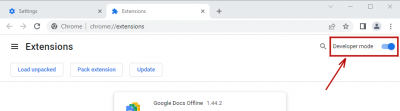
Developer mode
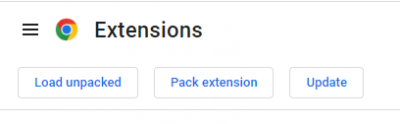
Load Unpacked


После этих операций уточнения, загрузка и сабмит должны работать корректно. Скорость загрузки зависит от вашего интернет соединения. Для загрузки браузер должен быть открыт. По всем вопросам обращайтесь в чат поддержки M+.
