Translations:Решение наиболее распространённых проблем/27/en: различия между версиями
Перейти к навигации
Перейти к поиску
| Строка 1: | Строка 1: | ||
| − | ==Why M+ moves files to archive instead removing it?== | + | ===Why M+ moves files to archive instead removing it?=== |
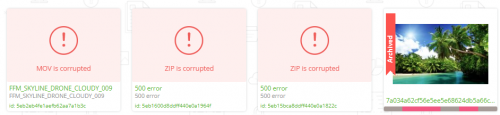
Moving a file to the archive is equivalent to deletion. The system stores only the file thumbnail along with its metadata, and these do not consume your disk space. At a later time, you may copy the file's metadata from the archive for use in subsequent works, or continue submitting the file to stock platforms (provided that the file has already been uploaded). In global search results, archived files are marked with a ribbon‑style badge on the left side. Broken files are displayed as shown in the example below: | Moving a file to the archive is equivalent to deletion. The system stores only the file thumbnail along with its metadata, and these do not consume your disk space. At a later time, you may copy the file's metadata from the archive for use in subsequent works, or continue submitting the file to stock platforms (provided that the file has already been uploaded). In global search results, archived files are marked with a ribbon‑style badge on the left side. Broken files are displayed as shown in the example below: | ||
| − | [[File:Archive eng.png|left| | + | [[File:Archive eng.png|left|500px]]<br clear=all> |
Текущая версия на 17:19, 6 мая 2026
Why M+ moves files to archive instead removing it?
Moving a file to the archive is equivalent to deletion. The system stores only the file thumbnail along with its metadata, and these do not consume your disk space. At a later time, you may copy the file's metadata from the archive for use in subsequent works, or continue submitting the file to stock platforms (provided that the file has already been uploaded). In global search results, archived files are marked with a ribbon‑style badge on the left side. Broken files are displayed as shown in the example below:

