Управление тарифами и пакетами подписок/en: различия между версиями
| (не показано 20 промежуточных версий этого же участника) | |||
| Строка 16: | Строка 16: | ||
* To change interface language, left-click the current language and choose an option from the dropdown list. | * To change interface language, left-click the current language and choose an option from the dropdown list. | ||
| − | The colored tiles below mostly represent payment plans and packages for our core service and its additional services, such as [[Special:MyLanguage/Работа с MicroStock+Trends | M+Trends]], [[Special:MyLanguage/Работа с MicroStock+Analytics | M+Analytics]], [[ | + | The colored tiles below mostly represent payment plans and packages for our core service and its additional services, such as [[Special:MyLanguage/Работа с MicroStock+Trends | M+Trends]], [[Special:MyLanguage/Работа с MicroStock+Analytics | M+Analytics]], [[#MicroStock+Storage | MicroStock+Storage]], and more. |
At the very bottom of the page, you can review our Privacy Policy, Terms of Service, and Refund Policy. | At the very bottom of the page, you can review our Privacy Policy, Terms of Service, and Refund Policy. | ||
| Строка 116: | Строка 116: | ||
After the transaction is successfully completed and the payment is approved by the system, the full cost of the package will be credited to your balance. | After the transaction is successfully completed and the payment is approved by the system, the full cost of the package will be credited to your balance. | ||
| − | + | Every M+ user is granted with 200 GB of free cloud storage space but you may rent up to 4 TB of additional space for your files with MicroStock+Storage. You may only purchase a subscription package for this service for a period from 6 months to 4 years. Please, DO NOT top up the balance to purchase any subscription package! | |
| − | |||
| − | |||
| − | |||
| − | |||
| − | |||
| − | |||
| − | |||
| − | |||
| − | |||
===How to upgrade a payment package=== | ===How to upgrade a payment package=== | ||
| Строка 131: | Строка 122: | ||
If you won a free year of subscription to a more expensive payment plan than the one you use, a present will be activated immediately, the duration and submission usage will be reset. After the gifted subscription ends, you are not required to buy a new package! Simply go to "Plans" and schedule a switch for the next notional month. Because we already credited your discount at purchase, you won't lose any money. | If you won a free year of subscription to a more expensive payment plan than the one you use, a present will be activated immediately, the duration and submission usage will be reset. After the gifted subscription ends, you are not required to buy a new package! Simply go to "Plans" and schedule a switch for the next notional month. Because we already credited your discount at purchase, you won't lose any money. | ||
| − | ===How to switch to a | + | ===How to switch to a less expensive payment package=== |
| − | + | Immediately after payment, the funds will be credited to your balance, but won't be deducted until your current conditional month ends. During this waiting period, the package will be marked as Pending activation. | |
| − | If you | + | If you win a free one‑month subscription to a package that is cheaper than your current one, it will simply be scheduled as a regular switch to a cheaper package. After the gifted subscription ends, you are not required to buy a new package! Simply go to "Plans" and schedule a switch for the next notional month. |
| − | |||
==MicroStock+ Trends== | ==MicroStock+ Trends== | ||
| + | |||
[[File:4a583e5a4a86a3bf46f7b052196bbd89.png|left|x300px|]]<br clear=all> | [[File:4a583e5a4a86a3bf46f7b052196bbd89.png|left|x300px|]]<br clear=all> | ||
| − | |||
| − | |||
| − | |||
| − | |||
| − | + | Learn more about Microstock+ Trends in this [[Special:MyLanguage/Работа с MicroStock+Trends|article]] | |
| − | [[ | ||
| − | |||
| − | + | This page is quite similar to StockSubmitter/М+ payment plans page. Paid subscriptions renew automatically from your balance. You can upgrade to a more expensive plan by paying only the price difference, under the same terms as StockSubmitter plans. Switching to a cheaper plan is only possible at the end of the last paid notional month. In the Packages tab, you can purchase a package for a term of six months or more. Please remember that packages CANNOT be purchased with your balance! | |
| − | |||
| − | |||
| − | |||
| − | |||
| − | |||
| − | |||
| − | |||
==MicroStock+Storage== | ==MicroStock+Storage== | ||
| − | |||
| − | |||
| − | |||
| − | |||
| − | |||
[[File:Storage.png|left|x300px|]]<br clear=all> | [[File:Storage.png|left|x300px|]]<br clear=all> | ||
| − | |||
| − | + | Every M+ user is granted with 200 GB of free cloud storage space but you may rent up to 4 TB of additional space for your files with MicroStock+Storage. You may only purchase a subscription package for this service for a period from 6 months to 4 years. Please, DO NOT top up the balance to purchase any subscription package! | |
| − | |||
| − | |||
| − | + | The packages for this particular service don't extend automatically. When the package period will be over you'll receive a relevant notification. If you'll miss the notification, we'll send an e-mail to your register e-mail box to remind about a payment. You'll be denied from uploading files to M+ until you purchase another package or delete enough files to reach 200 GB limit. If you won't solve the problem within a month, unfortunately we're going to have to delete some of your files from M+. | |
| − | + | ||
| − | + | ==How to vote for the next microstock agencies?== | |
| − | |||
| − | |||
[[File:New stock eng.png |left|700px|]]<br clear=all> | [[File:New stock eng.png |left|700px|]]<br clear=all> | ||
| − | |||
| − | |||
| − | |||
| − | |||
| − | |||
| − | |||
| − | + | Adding and fully supporting agencies to our services takes a lot of our time and resources. That is why we had opened a poll for all users. When you make any purchase on our service, you receive the opportunity to vote for one of the 7 most popular candidates, or add a new candidate and vote for them instead. | |
| − | |||
| − | |||
==Frequently asked questions== | ==Frequently asked questions== | ||
===How to cancel a paid subscription?=== | ===How to cancel a paid subscription?=== | ||
| − | Go to the Store and open a page with payment | + | Go to the Store and open a page with payment plans (for StockSubmitter/M+ or M+ Trends) then select a Free payment plan. This payment plan will be activated at the end of the current notional month. |
| − | |||
===I'm a Free subscription user but I'd like to try a paid subscription. Where do I begin?=== | ===I'm a Free subscription user but I'd like to try a paid subscription. Where do I begin?=== | ||
| − | + | Estimate your average number of submits per month and take a look at our affordable plans and packages. If needed, you can always upgrade to a [[#How to upgrade your current payment plan|more expensive plan]] by paying only the price difference, or Increase your limit. | |
| − | |||
===How do I switch back to a Starter package/how to save a Starter payment plan when the package has expired?=== | ===How do I switch back to a Starter package/how to save a Starter payment plan when the package has expired?=== | ||
| − | If you've been using a Starter payment | + | If you've been using a Starter payment plan and then switch to a different plan, the only way to return to Starter is to purchase the package again. However, once three months have passed, you can continue using this plan as long as your balance has sufficient funds to pay for a notional month of usage. |
| − | |||
===I've purchased a one-year package but realized I don't need it. What do I do?=== | ===I've purchased a one-year package but realized I don't need it. What do I do?=== | ||
Purchasing a package doesn't mean that you must keep using it for the entire duration. | Purchasing a package doesn't mean that you must keep using it for the entire duration. | ||
| − | |||
| − | |||
| − | + | You've been credited with a full package price, as if you've purchased several months of payment plan usage. So you may change your payment plan at any time. | |
| − | + | ||
| − | + | ===I've upgraded my payment plan but my submissions weren't reset!=== | |
| + | When you upgrade your payment plan, your submits are reset only at the end of the conditional month. If you upgrade to a more expensive plan, a certain number of additional submits will simply be added to your account. | ||
| − | |||
| − | |||
| − | |||
<blockquote>''For instance, let's say you're using Lite payment plan. You've got 250 submissions per month. You've already used 200 of them and you're about to purchase Casual payment plan. You pay 10 EUR to upgrade and now have 200 more submissions to use until the end of the current notional month.''</blockquote> | <blockquote>''For instance, let's say you're using Lite payment plan. You've got 250 submissions per month. You've already used 200 of them and you're about to purchase Casual payment plan. You pay 10 EUR to upgrade and now have 200 more submissions to use until the end of the current notional month.''</blockquote> | ||
| − | |||
| − | |||
| − | |||
| − | |||
| − | |||
Текущая версия на 21:54, 7 апреля 2026
Paid and free subscriptions are managed through our store. To access the store, click the current payment plan name in the upper‑right corner of the M+ interface, or select "Store" from the left menu.
Click the StockSubmitter logo in the top-left corner to return to the store’s main page at any time. To the right, you will find your balance, email address, and language settings.
Содержание
- 1 Store interface
- 2 Scheduled actions
- 3 What does "a month" mean within a subscription?
- 4 How to top up your balance
- 5 Subscription packages
- 6 What's a subscription plan and what's a subscription package?
- 7 Subscription packages
- 8 MicroStock+ Trends
- 9 MicroStock+Storage
- 10 How to vote for the next microstock agencies?
- 11 Frequently asked questions
- 11.1 How to cancel a paid subscription?
- 11.2 I'm a Free subscription user but I'd like to try a paid subscription. Where do I begin?
- 11.3 How do I switch back to a Starter package/how to save a Starter payment plan when the package has expired?
- 11.4 I've purchased a one-year package but realized I don't need it. What do I do?
- 11.5 I've upgraded my payment plan but my submissions weren't reset!
Store interface
The store's top menu allows you to return to the main page, and also displays your current balance, email address, and language settings
- To return to the main page from any store page, left-click the StockSubmitter logo.
- To top up your balance (NOT to purchase plans!), view available promo codes, or review your financial transactions, left-click your balance and select the appropriate option from the dropdown list. For more details on topping up your balance, see here.
- To switch accounts or change the password for your current account, left-click your email address and select the relevant dropdown option.
- To change interface language, left-click the current language and choose an option from the dropdown list.
The colored tiles below mostly represent payment plans and packages for our core service and its additional services, such as M+Trends, M+Analytics, MicroStock+Storage, and more.
At the very bottom of the page, you can review our Privacy Policy, Terms of Service, and Refund Policy.
Now let's take a closer look at the plans: their duration, how they differ from packages, how to top up these plans, and how to cancel a subscription.
Scheduled actions

This tile describes events that will take place on your account in the nearest future. The date in this tile is the last day of the current notional month. Thanks to this tile you always know the deadline for topping up your balance and which services are currently active on your account.
What does "a month" mean within a subscription?
We use a notional month as a unit of time measurement. It is a 30-days period starting starting from the moment of switching or activating plans or the last payment. Please note that some calendar months have 31 days or 28/29 days, so your payment date may shift and, for example, will not always fall on the first day of the calendar month.
What is submission and how do we calculate them is explained in this article.
How to top up your balance
Subscription packages

To do this, click your balance in the upper‑right corner of the interface and select "Top up" from the dropdown menu. You will be directed to the balance top‑up form. Simply enter the required amount and click the "Top up" button. Next, choose your preferred payment system, click the Choose button, and follow the instructions. Please note that funds may not appear in your balance immediately. The exact processing time depends on the chosen payment system.
How to get and use promocodes?
Every Christmas we perform a raffle among users. Make any purchases during a specified time period and get a Christmas present for every certain amount of money. There's a random prize inside of every present. You may find promocodes for a certain sum in EUR. You can't top up your balance with it but you may use it to cover up to 50% of any payment package. To use a promocode, select any package you'd like to purchase. Select a payment method and notice a I Have A Promocode! button. Click it, paste a promocode then click Apply. To use another promocode for the same deal, just paste it in the form and click Apply again.
What's a subscription plan and what's a subscription package?
A Subscription plan provides a single notional month (30-days period) of our service. Details for each individual plan are described in a plan card. Hover your mouse cursor over the question mark icon in the card to see extra information, such as available child accounts or the number of submits per notional month.

Under a subscription plan, your subscription fee is deducted from your balance monthly. Feel free to top up your balance for multiple months ahead — deductions will keep occurring until you change your plan or your funds run out. If your balance reaches zero, you will be automatically moved to the free plan.
A subscription plan is a convenient way to try a paid service and determine how many submissions you need per month. Our system is highly flexible: you can purchase submissions at retail, or instantly upgrade your current plan by paying only the difference between your existing plan and a more expensive one. You can also schedule a switch back to your original plan.
Important: You cannot pay for subscription packages with your balance! Do not top up your balance in advance if you plan to purchase a package. For information on how to purchase subscription packages, please refer to the relevant section.
StockSubmitter and Microstock+ payment plan management

This tile represents your current payment plan and available submissions.
With the Increase Limit button you can increase the limit in the current notional month.
- Click the Increase Limit button
- Input the number of submissions you'd like to purchase
- Click the Purchase button.
Our system is designed to give you the greatest benefit when you submit one file to many agencies. That's why submits are applied to all supported agencies simultaneously — helping you earn the maximum possible return from each file. Since we do not operate a billing system, we are unable to sell submits for just one stock agency or exchange submits from one agency for submits from another.
To track the number of submits you have used, hover your mouse cursor over Submissions remaining button.
Use the Change Plan button to manage M+ and StockSubmitter plans and packages. See the Subscription Packages section below for more information on packages.
How to upgrade your current payment plan
You can instantly upgrade your current plan. In this case, the price difference between the plans will be deducted from your balance. However, the first day of your conditional month will remain the same (it will not shift), your submit usage will not reset, and you will receive only the benefits of the more expensive plan (for example, more submits per month).
For example, you'd like to upgrade your current Lite payment plan to Casual. The last payment was at 6'th of December. Tomorrow will be 3'th of January. If you're going to upgrade your payment plan right now, a full monthly fee for Casual plan will be deducted from your balance at 5'th of January (there are 31 days in January). Please, consider whether you will have enough time to use all of your submits before the end of the current notional month.
How to switch to a cheaper payment plan?
If you're planning to switch to a cheaper payment plan, please, do it during a current notional month otherwise your payment plan will be automatically extended.
Switching to a cheaper plan takes place at the end of the last paid notional month, but you can schedule this event at any time. Select a cheaper plan by clicking the Choose button in the plan's card, and it will activate automatically by the specified date. Payment for any plan occurs at the moment of activation (the end of the current 30-day period), please, make sure your balance has enough funds. If your balance is insufficient, you will be automatically switched to the Free payment plan.
Subscription packages
Subscription package entails a discounted one-time purchase of Subscription plan for one or several months (depending on a package).
A Subscription package provides a significant profit, especially when you submit a lot.
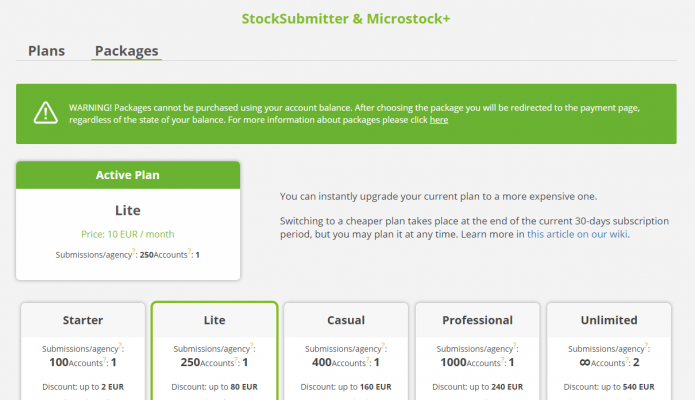
Subscription package

For example, you purchased the Casual subscription package for 6 notional months at the 3'th of January. You've paid 100 EUR and your balance has increased by 120 EUR. During next 6 months a monthly fee of 20 EUR will be taken from your balance: the next payment will be at the 2'th of February, then at the 4'th of March and so on until the end of the 6 months or the moment you run out of money on balance. Thus you pay a monthly fee as if you use a payment plan but we reimburse you the amount of the discount.
This is very convenient because you won't have to wait for your package to expire if it no longer meets your needs, or if you urgently need to make purchases in our store. Any unused funds (after deducting the month you've already used) will remain on your balance and can be used for other services (but not for packages!).
After your package expires, you will continue to be charged according to the plan associated with the package you purchased. If your balance has insufficient funds, you will be switched to the Free plan.
Packages such as Professional and Unlimited are designed for experienced stock contributors and studios. You can pay for up to two years upfront and never worry about remaining submits or balance top‑ups. The Starter and Lite packages are perfect for beginners and those whose submit varies by season or depends on files per shoot. Follow us on social media to receive additional discounts on packages during annual promotions. Our service offers packages for the following services: StockSubmitter/M+, M+Trends, and M+Storage. Packages are not available for M+Analytics.
To purchase a package click the Change/Change plan button in any service tile on the Store main page. Select the Packages tab. M+Storage service doesn't provide any payment plans and you'll be automatically directed to the Packages tab. For your convenience, if you already have a plan or package, your current plan will be displayed on this page. Click the Show Packages button below any of the package blocks.
- Select a suitable time period in the dropdown list.
- Read the terms of use and click OK button if you're agree.
- You'll be moved to the payment page.
- Select a preferred payment method from a dropdown list.
- If you have one or several promocodes, type or copypaste it in the form. You can cover up to 50% of your purchase with promocodes.
- Click the Agree button and follow the instructions.
After the transaction is successfully completed and the payment is approved by the system, the full cost of the package will be credited to your balance.
Every M+ user is granted with 200 GB of free cloud storage space but you may rent up to 4 TB of additional space for your files with MicroStock+Storage. You may only purchase a subscription package for this service for a period from 6 months to 4 years. Please, DO NOT top up the balance to purchase any subscription package!
How to upgrade a payment package
If you already have an active package and purchase a more expensive one, the remaining duration and submits from your current package will be reset. The full price of the new plan will then be charged, and that date will become the start of a new notional month. If you won a free year of subscription to a more expensive payment plan than the one you use, a present will be activated immediately, the duration and submission usage will be reset. After the gifted subscription ends, you are not required to buy a new package! Simply go to "Plans" and schedule a switch for the next notional month. Because we already credited your discount at purchase, you won't lose any money.
How to switch to a less expensive payment package
Immediately after payment, the funds will be credited to your balance, but won't be deducted until your current conditional month ends. During this waiting period, the package will be marked as Pending activation. If you win a free one‑month subscription to a package that is cheaper than your current one, it will simply be scheduled as a regular switch to a cheaper package. After the gifted subscription ends, you are not required to buy a new package! Simply go to "Plans" and schedule a switch for the next notional month.
MicroStock+ Trends

Learn more about Microstock+ Trends in this article
This page is quite similar to StockSubmitter/М+ payment plans page. Paid subscriptions renew automatically from your balance. You can upgrade to a more expensive plan by paying only the price difference, under the same terms as StockSubmitter plans. Switching to a cheaper plan is only possible at the end of the last paid notional month. In the Packages tab, you can purchase a package for a term of six months or more. Please remember that packages CANNOT be purchased with your balance!
MicroStock+Storage

Every M+ user is granted with 200 GB of free cloud storage space but you may rent up to 4 TB of additional space for your files with MicroStock+Storage. You may only purchase a subscription package for this service for a period from 6 months to 4 years. Please, DO NOT top up the balance to purchase any subscription package!
The packages for this particular service don't extend automatically. When the package period will be over you'll receive a relevant notification. If you'll miss the notification, we'll send an e-mail to your register e-mail box to remind about a payment. You'll be denied from uploading files to M+ until you purchase another package or delete enough files to reach 200 GB limit. If you won't solve the problem within a month, unfortunately we're going to have to delete some of your files from M+.
How to vote for the next microstock agencies?

Adding and fully supporting agencies to our services takes a lot of our time and resources. That is why we had opened a poll for all users. When you make any purchase on our service, you receive the opportunity to vote for one of the 7 most popular candidates, or add a new candidate and vote for them instead.
Frequently asked questions
How to cancel a paid subscription?
Go to the Store and open a page with payment plans (for StockSubmitter/M+ or M+ Trends) then select a Free payment plan. This payment plan will be activated at the end of the current notional month.
I'm a Free subscription user but I'd like to try a paid subscription. Where do I begin?
Estimate your average number of submits per month and take a look at our affordable plans and packages. If needed, you can always upgrade to a more expensive plan by paying only the price difference, or Increase your limit.
How do I switch back to a Starter package/how to save a Starter payment plan when the package has expired?
If you've been using a Starter payment plan and then switch to a different plan, the only way to return to Starter is to purchase the package again. However, once three months have passed, you can continue using this plan as long as your balance has sufficient funds to pay for a notional month of usage.
I've purchased a one-year package but realized I don't need it. What do I do?
Purchasing a package doesn't mean that you must keep using it for the entire duration.
You've been credited with a full package price, as if you've purchased several months of payment plan usage. So you may change your payment plan at any time.
I've upgraded my payment plan but my submissions weren't reset!
When you upgrade your payment plan, your submits are reset only at the end of the conditional month. If you upgrade to a more expensive plan, a certain number of additional submits will simply be added to your account.
For instance, let's say you're using Lite payment plan. You've got 250 submissions per month. You've already used 200 of them and you're about to purchase Casual payment plan. You pay 10 EUR to upgrade and now have 200 more submissions to use until the end of the current notional month.
