Translations:Дочерние аккаунты MicroStock+/5/en: различия между версиями
Перейти к навигации
Перейти к поиску
(Новая страница: «== How to assign an account as a child account? == First, verify whether your plan permits the connection of child accounts. Users on the Free, Lite, Starter, and...») |
|||
| Строка 4: | Строка 4: | ||
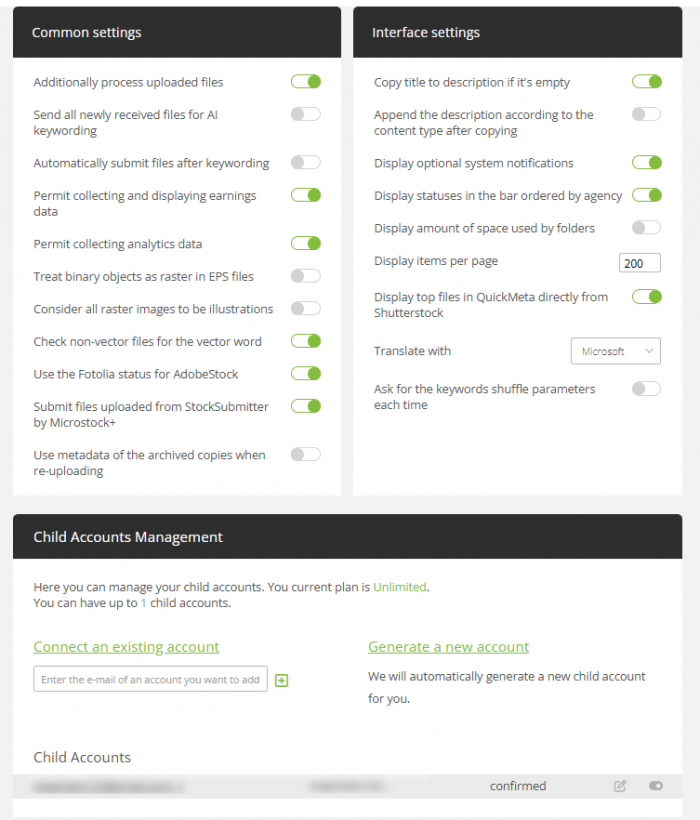
If you are using the Unlimited plan or higher, go to your dashboard and scroll down past the Common Settings. | If you are using the Unlimited plan or higher, go to your dashboard and scroll down past the Common Settings. | ||
| − | [[File | + | [[File:Child account eng.png|left|700px]]<br clear=all> |
The "Generate a new account" button creates a new child account with the same password as your main account. If you registered via social media, the password for the new account will be "123", so we strongly recommend changing it to a more secure one as soon as possible. | The "Generate a new account" button creates a new child account with the same password as your main account. If you registered via social media, the password for the new account will be "123", so we strongly recommend changing it to a more secure one as soon as possible. | ||
Текущая версия на 16:48, 6 мая 2026
How to assign an account as a child account?
First, verify whether your plan permits the connection of child accounts. Users on the Free, Lite, Starter, and Professional plans cannot have child accounts.
If you are using the Unlimited plan or higher, go to your dashboard and scroll down past the Common Settings.

The "Generate a new account" button creates a new child account with the same password as your main account. If you registered via social media, the password for the new account will be "123", so we strongly recommend changing it to a more secure one as soon as possible.
